
Reviews · Gaming
Skiller SGM50W Review: A Little Surprise!
Abel Visser · July 23, 2025
Expectations:
I've never tried a Sharkoon mouse before, but it's a familiar name. From what I've heard, its mice are good, so I'm expecting solid quality. I use the G Pro Superlight myself, a really nice mouse because it's light and not too bulky, which I really appreciate. Of course, that's a matter of personal preference. The Sharkoon, on the other hand, is larger than I'm used to, so I was curious to see whether the SGM50W could change my mind. It's wireless, which is definitely a plus. It gives you more freedom while gaming. It's packed with RGB, which I secretly love. When I opened the box, there was a surprise… read on 🙂

First impressions:
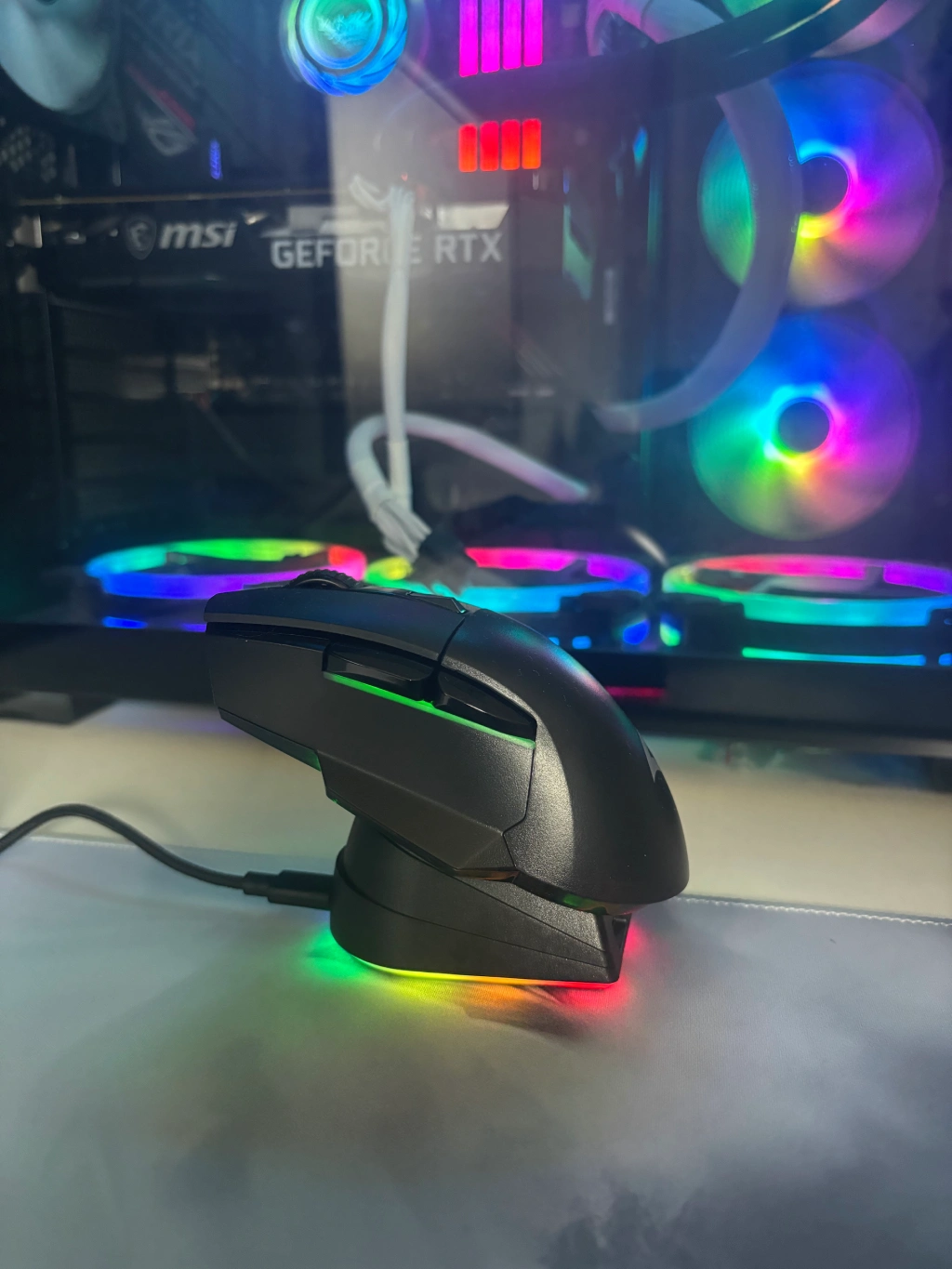
What was the surprise? The Skiller SGM50W mouse comes with a charging dock. REALLY COOL. It's practical and fun! A little extra that makes the whole package feel a bit more special. Of course, there are plenty of other types and brands out there, but what I like about this one is that you simply place your mouse on it and it charges. Pure convenience—a nice-to-have extra.
‘Huh, it stays put.’ The charging dock has grippy feet underneath. NOT adhesive pads. I thought it was odd that you'd have to stick it to your desk, but thankfully, it has handy grip strips underneath instead. A thoughtful design choice. The mouse feels good, and my hand immediately settles into a comfortable position. As I mentioned, the Skiller SGM50W is a little larger, but that creates an issue. The Skiller SGM50W is marketed as a gaming mouse, yet my thumb rests below the side buttons rather than on them. That's often not the case with smaller mice, which gives them a slight edge when gaming. A small downside, then. The mouse has 6 different DPI settings: 400, 1200, 2400, 3600, 4800 and 6400. It's a shame there's no 800 DPI step between 400 and 1200, as that's quite a jump. With no software available, you can't change this either. You do get a 2.4 GHz wireless connection and a 1000 Hz polling rate, but the polling rate isn't adjustable either, for anyone who would want to change it.

RGB:
Like the mouse itself, the Skiller SGM50W's charging dock offers several RGB effects. I'll try to describe them:
-Rainbow colours in a strip
-Rainbow colours that slowly transition from one colour to another
-Rainbow colours that pulse into the next colour
-A rainbow strip that switches on and off, then changes colour
-And, of course: RGB completely off
Sharkoon advertises that no software is needed, as there's a button underneath the mouse to adjust the colours (the same goes for the dock). Personally, I'm not a fan: without software, you can't customise the DPI, create macros or adjust the RGB effect speeds. Software would add a lot more value to the mouse. The transparent underside lets the colours show through nicely in daylight, though I'd have liked them to be a little brighter. In the dark, I also find the colours somewhat underwhelming, as only the bottom and sides let light through. There was room for more here.
Underneath the mouse is a switch with three positions:
Top: Wireless connection with RGB
Middle: Off, wired connection
Bottom: Wireless connection without RGB

Hands-on experience:
Sure, I could just give you my first impressions, but that wouldn't be very useful. So, it's time to put the Skiller SGM50W to work. It didn't feel like a heavy mouse to me, so I grabbed a scale: 93 grams. Huh?! That's actually quite heavy, especially compared with the Superlight. It didn't really bother me while gaming, though. What did stand out were the side buttons. They really are too high, which I consider a drawback for gaming.
The Skiller SGM50W also switches itself off after a period of inactivity. To turn it back on, simply click any mouse button, and it wakes up again. The scroll wheel works brilliantly too; it feels really nice and smooth, without any stuttering. The mouse also glides nicely across the mouse pad. I use the SGP40 D9, which I've also had the chance to review. Want to know what that feels like? Be sure to read that review too!
Comparison with the Superlight:
Time to do some gaming with the Skiller SGM50W gaming mouse! This is always my favourite part of reviewing, though of course I still have to pay close attention and test everything. Nothing can be skipped. The game is Isonzo, a slower-paced shooter compared with something like Call of Duty. As a result, I noticed little difference between the Skiller and the Superlight. Both were pleasant to play with.
Okay, let's try a more hectic shooter. You'll never guess….. Call of Duty, of course. Since I've always played at 800 DPI, 400 feels a little too slow and 1200 a little too fast. That's something to keep in mind.
If you switch to 400 DPI, you'll need to double your sensitivity. At 1200 DPI, divide it by roughly 2. Okay, enough about settings—you just want to know whether it's good for gaming. Yes! It performs well overall. In Call of Duty, I really did notice the difference in weight, so it's up to you to decide which you prefer: a heavier mouse or a lighter one.
Conclusion
A cool mouse with a sleek design and a handy charging dock. The RGB looks nice, but could be brighter. It's comfortable to hold, although it's a little larger and heavier than I'm used to (perhaps my hands are on the smaller side). The side buttons sit a little too high for fast-paced games. The lack of software is a shame, especially for DPI customisation and macros. Still, I enjoyed gaming with it, and it delivers what I want, particularly in slower-paced shooters and games. A solid choice for the price.
Verdict
Solid, with a few caveats.
Pros
- RGB (could be a little brighter)
- Price
- Charging dock
Cons
- No software