
Reviews · Telefoon
Review: Oppo Find x8 Pro
Abel Visser · February 16, 2025
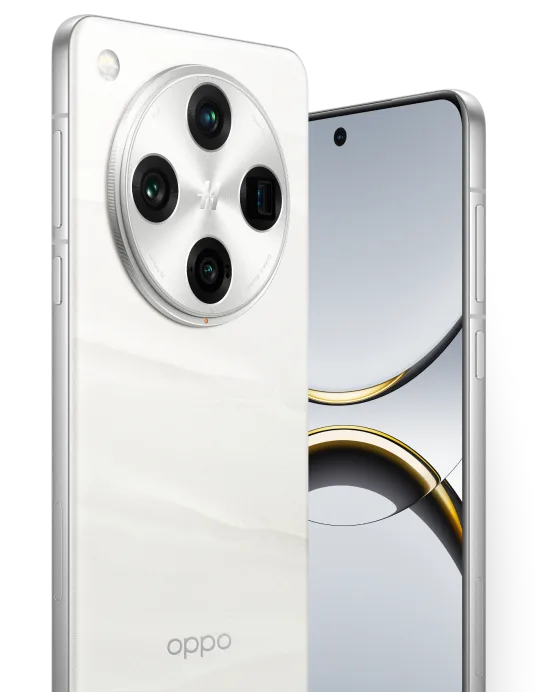
Oppo Find x8 Pro
The Oppo Find x8 Pro is quite a mouthful, and the phone itself is just as packed with fun features. With a stylish design and smart technology, this device is perfect for anyone looking to get the most out of their day. Whether you are working, relaxing or getting creative, the Find X8 Pro supports you in everything you do. I have always been an Iphone user, but after testing and using the Find x8 Pro, I have started considering a switch to Android. The Find x8 Pro is packed with fun AI features that let you remove a person or other visible objects from a photo. The phone also comes with an app called ‘Ai-studio’, which lets you generate photos. For example, you can suddenly become a pirate. It is great fun, and ai reimage lets you give your photo a completely different style. So this is a phone full of AI functionality. AI is certainly a hot topic, so Oppo is pulling out all the stops here. That makes sense, given that it is all anyone seems to talk about these days. There is plenty to cover, so let me start with the specifications.
Specifications
| Category | Specification |
|---|---|
| Display | |
| Screen size | 6.78 inch |
| Resolution | 2780 x 1264 |
| Display type | AMOLED |
| Pixel density | 450 ppi |
| Refresh rate | 120 Hz |
| Always-on display | Yes |
| Keyboard type | Touchscreen |
| Processor and memory | |
| Chipset | MediaTek Dimensity 9400 |
| CPU cores | Octa Core |
| RAM | 16 GB |
| Internal storage | 512 GB |
| Expandable storage | No |
| Rear camera | |
| Number of lenses | 4 |
| Camera 1 – Megapixels | 50 MP |
| Camera 1 – Autofocus | Yes |
| Camera 1 – Image stabilisation | Yes (OIS) |
| Camera 1 – Digital zoom | Yes |
| Camera 1 – Optical zoom | No |
| Video resolution | 4K (3840 x 2160) |
| Video frame rate | 60 fps |
| Flash | Yes |
| Flash type | Dual LED |
| Camera 2 – Lens type | Wide-angle lens |
| Camera 2 – Megapixels | 50 MP |
| Camera 2 – Image stabilisation | Yes |
| Camera 2 – Optical zoom | No |
| Camera 3 – Lens type | Periscope lens |
| Camera 3 – Megapixels | 50 MP |
| Camera 3 – Image stabilisation | Yes |
| Camera 3 – Optical zoom | Yes (6x optical) |
| Camera 4 – Lens type | Periscope lens |
| Camera 4 – Megapixels | 50 MP |
| Camera 4 – Image stabilisation | Yes |
| Camera 4 – Optical zoom | Yes |
| Front camera | |
| Number of lenses | 1 |
| Camera 1 – Lens type | Standard |
| Camera 1 – Video resolution | 4K (3840 x 2160) |
| Audio | |
| 3.5 mm headphone jack | No |
| Bluetooth stereo (A2DP) | Yes |
| Speaker | Stereo |
| Battery | |
| Replaceable | No |
| Capacity | 5910 mAh |
| Type | Lithium-Ion |
| Wireless charging | Yes |
| Wireless charging power | 50 watt |
| Fast charging | Yes |
| Maximum charging power | 80 watt |
| Reverse charging | Yes |
| Body | |
| Weight | 215 gram |
| Body material | Aluminium |
| Dustproof | Yes |
| Splashproof | Yes |
| Waterproof | Yes |
| IP rating | IP69 |
| MagSafe | No |
| Foldable | No |
| SIM card type | Nano sim |
| eSIM | Yes |
| Dual SIM | Yes |
| Second SIM card type | Nano sim |
| Operating system and update policy | |
| Operating system (at launch) | Android 15 |
| Operating system (final OS) | Android 20 (expected) |
| Expected number of OS updates | 5 |
| Security updates until | 2030 (expected) |
| User interface | ColorOS |
| Connectivity | |
| 2G (edge, gprs) | Yes |
| 3G (hspa, hspa+, hsdpa, hsupa, umts) | Yes |
| 4G (lte) | Yes |
| 4G+ (lte advanced) | Yes |
| 5G | Yes |
| Frequency range | 800, 850, 900, 1800, 1900, 2100, 2600 MHz |
| WiFi | Yes |
| WiFi standard | Wi-Fi a/b/g/n/ac/ax/be (Wi-Fi 1,2,3,4,5,6,7) |
| 5GHz support | Yes |
| NFC | Yes |
| Bluetooth | Bluetooth 5.4 |
| Infrared | No |
| Connector | USB-C |
| Sensors | |
| GPS | Yes |
| Accelerometer | Yes |
| Gyroscope | Yes |
| Proximity sensor | Yes |
| Compass | Yes |
| Barometer | No |
| Heart rate monitor | No |
| Fingerprint scanner | Yes |
| Facial recognition | Yes |
| General | |
| Manufacturer's warranty | 1 year |
General features
The phone feels a little heavier than usual in the hand. The large circular camera housing on the back makes it easy to hold. There are three ways to unlock it. First, there is facial recognition, which works well, although it is sometimes a little slow, by which point I have already unlocked the phone with my fingerprint. The fingerprint scanner works perfectly when you place your thumb or finger straight on the phone. Sometimes it fails to recognise my thumb when I place it at an angle to unlock the device. Registering my fingerprint more carefully might resolve this. Often, facial recognition takes over and unlocks the phone anyway. When you unlock it with your fingerprint, a lovely animation appears beneath your thumb or finger. I really like how it looks, and it is nice to see Oppo adding these little details. Third, but certainly not least, is the old-fashioned passcode. That always works, of course.
When I first unlocked the phone, I was greeted by a neatly organised home screen that Android users will find familiar. Swiping up to access all the apps is very smooth, and the phone responds brilliantly. I did not experience any freezes in menus or anything similar. The phone is packed with AI features that finally make editing your photos fun, and they work brilliantly! The AI does a good job of recognising what you want to adjust, and transferring everything over was a breeze.
The display supports up to 120hz, making scrolling much more enjoyable. A major plus, if you ask me.

The camera
Oppo has released two models, the Oppo Find x8 and the Oppo Find x8 Pro. Today, I am reviewing only the Pro version. The Pro has four cameras, all with 50 MP sensors. Thanks to AI and the phone's smart software, photos are very sharp, and the Oppo produces much sharper images than my iphone 11. It really is a world of difference. I also looked up comparisons online, where the Oppo performed well in testing. With its 120x zoom, the Oppo can capture subjects from an impressive distance, and even then, the photo remains reasonably sharp.
During my time testing the Oppo, I was genuinely surprised by the beautiful photos it can take. The camera interface is similar to Apple's, although there are more options at the top of the screen to fine-tune the camera for whatever you need at that moment. I noticed no delay between pressing the shutter and the photo actually being taken. The Pro version also has a ‘Quick button’ near the bottom of its right-hand side. This lets you take a photo in just three clicks, which is perfect when something spontaneous happens and you want to capture it quickly. I am very pleased with the camera and its capabilities!
AI features
As mentioned several times already, the phone is overflowing with AI features, including Ai-studio. This app lets you transform photos and give them a completely different style. It takes very little effort: simply upload a photo of your face to the app, which comes from Oppo itself, making it safe to use too. You can then select a fun character, such as a pirate, and after a short wait, you become that pirate. There are plenty of possibilities, and it is fun to see new options to play around with.

Another nice detail is that you can leave the app while it processes your image, so you do not have to sit and wait for Ai studio to finish. Of course, you can also touch up your own photos with AI. To do this, go to Edit and tap the AI editor button. From there, you can let AI adjust your photo, which is genuinely fun to do. You can also press and hold the power button to launch Gemini, which is a little like Siri and ChatGPT combined.
Conclusion
In short, this is a fantastic phone for someone used to Apple. It takes genuinely good photos for photography enthusiasts, and AI turns it into a really fun device to play with. The phone is fast and easy to use. A great flagship!
Price and availability
The price ranges from around EUR 880 to approximately EUR 1000. That is a lot of money, but we see similar prices from other brands, so it is not particularly surprising. And you really do get a good phone in return! Personally, I think it is a little on the expensive side, but if your budget falls within this price range, do not get me wrong…
Verdict
Recommended – a strong pick in its class.
Pros
- Value for money
- Extensive and fun AI features
Cons
- Price is a little on the high side