
Reviews · Gaming
Review: Elgato Streamdeck
Maurice De Pauw · February 11, 2024
[ai_post_generator_toc]
Introduction to the Elgato Streamdeck
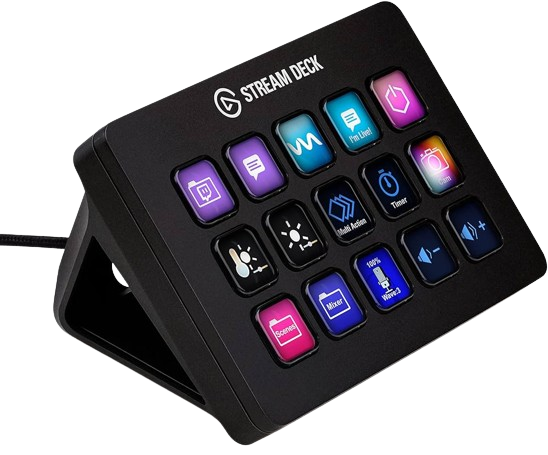
The Elgato Streamdeck is a much-discussed streaming accessory that is becoming increasingly popular among content creators and streamers. With its versatile features and user-friendly interface, the Streamdeck offers a whole new way to manage and stream your content. In this article, we will put the Elgato Streamdeck through its paces and explore every aspect of it.
But where the Stream Deck really shines is its functionality. Its programmable LCD keys offer an incredible degree of customization. I can perform my most frequently used actions, such as switching scenes, starting and stopping recordings, sending preset chat messages, and even controlling my lighting, all at the press of a button.
Installing and Configuring the Elgato Streamdeck
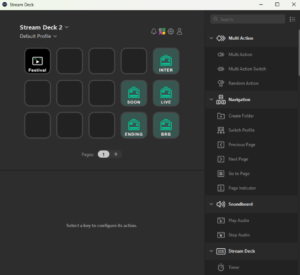
Installing the Elgato Streamdeck is straightforward and requires no technical knowledge. All you need is a free USB port on your computer and Elgato's companion software. Once you connect the Streamdeck and install the software, you are guided through the configuration process step by step. You can even assign specific actions and macros to each button on the Streamdeck, giving you complete control over your streaming experience. Setting up commands and macros is surprisingly easy thanks to Elgato's intuitive software. I was able to quickly customize my layout to suit my specific needs, and the option to create folders allowed me to add even more commands while keeping everything organized.
Elgato Streamdeck Features and Capabilities
The Elgato Streamdeck offers a wide range of features and capabilities to enhance your stream. Its programmable buttons let you easily switch scenes, add overlays, send chat messages, and even adjust your lighting. Another highlight of the Stream Deck is its integration with popular streaming software such as OBS Studio, Streamlabs OBS, and XSplit. Managing my stream without leaving my main window feels seamless. And thanks to regular updates from Elgato, compatibility with the latest software is maintained. This allows users to manage their live streams without constantly switching between different windows or applications. Elgato's companion software also makes it easy for users to program their own commands and actions, giving them complete control over their streaming experience.
Practical Uses for the Elgato Streamdeck
The Elgato Streamdeck can be used in various ways to improve your streaming experience. Content creators can benefit from quickly and effortlessly adding overlays during their streams, while streamers can switch scenes at the press of a button. The Streamdeck can also be useful for managing chat interactions and executing custom commands to take your stream to the next level. Another pleasant surprise was the community of Stream Deck users. There are countless online resources, from Reddit communities to YouTube tutorials, where you can find tips and tricks to get the most out of your Stream Deck. This significantly shortened my learning curve and sparked my creativity when coming up with new ways to improve my stream.
Comparison with Other Streaming Accessories
While there are various streaming accessories on the market, the Elgato Streamdeck stands out for its ease of use and versatility. Compared with other streaming accessories, the Streamdeck offers an intuitive interface, fully customizable buttons, and excellent integration with popular streaming platforms. This makes it an ideal choice for both beginner streamers and experienced content creators.
Tips and Tricks for Using the Elgato Streamdeck
Here are some useful tips and tricks to help you get the most out of your Elgato Streamdeck. First, take advantage of the option to create folders on your Streamdeck to keep even more features and commands within easy reach. It is also worth creating different profiles so you can adapt your Streamdeck to different streaming setups. You can also browse online communities and forums for inspiration on using the Streamdeck and to discover new macros and actions.
Conclusion:
Verdict
Recommended – a strong pick in its class.
Pros
- Easy setup
- Customizable buttons
Cons
- Price is a little too high