
Reviews · Gaming
Corsair Sabre v2 PRO wireless
Maurice De Pauw · September 18, 2025
Introduction
Today we had the chance to test the Corsair Sabre v2 PRO wireless and share our review. And you know what… there are SO MANY mice out there, in all shapes and sizes and with all kinds of features. Personally, I really like a wireless mouse: it is convenient, with no annoying cable getting in the way. Of course, a wired mouse is hardly a major problem, and there are ways to keep the cable out of the way. As it happens, I currently use a Corsair Dark Core Pro SE, which I have been very happy with for quite some time. That makes me especially curious to see how the Corsair Sabre v2 PRO wireless performs. Let's start with the specifications below.

Specifications & Features
Specifications:
Connectivity: Wireless
Battery Type and Chemistry: Rechargeable, Li-ion polymer
Battery Life: Up to 70 hours at 1K Hz / Up to 16 hours at 8K Hz
Sensor: CORSAIR MARKSMAN S
Sensor Type: Optical
Sensor Resolution: 100 – 33,000 DPI, with 50 DPI steps
Onboard Profile: 1
Backlight: None
Buttons: 5
USB Report Rate: 1000/2000/4000/8000 Hz
Color: BLACK/WHITE
Mouse Feet: UPE
Dimensions: 119.16(L) mm x 62.55(W) mm x 38.21(H) mm/ 4.69(L) in x 2.46(W) in x 1.5(H) in
Weight: (w/o cable and accessories) 36 g / 0.079 lbs.
Warranty: 2 Year

Key features (from the manual)
1. Ultralight 36g design: Built from the ground up for elite FPS players, the 36g design delivers maximum agility and control for fast movements, smooth 180-degree turns and pinpoint aiming.
2. Make every millisecond count: 8000 Hz hyperpolling delivers low-latency input up to eight times faster than standard
polling. Whether wired or wireless, your commands register instantly when every millisecond counts.
3. Phenomenal precision: Equipped with CORSAIR’s MARKSMAN S sensor for true 33,000 dpi tracking, 750 IPS speed and 50G acceleration. Stay on target in fast-paced, high-pressure situations.
4. Custom-tuned tactile mechanical switches: Enjoy the satisfying tactile feedback of CORSAIR's custom-tuned mechanical switches. They are also incredibly reliable, match after match, from practice sessions to the main stage, with a lifespan of up to 100 million clicks.
5. Up to 70 hours of wireless battery life*: Play for up to 70 hours on a single charge, enough for extended practice sessions or tournaments.
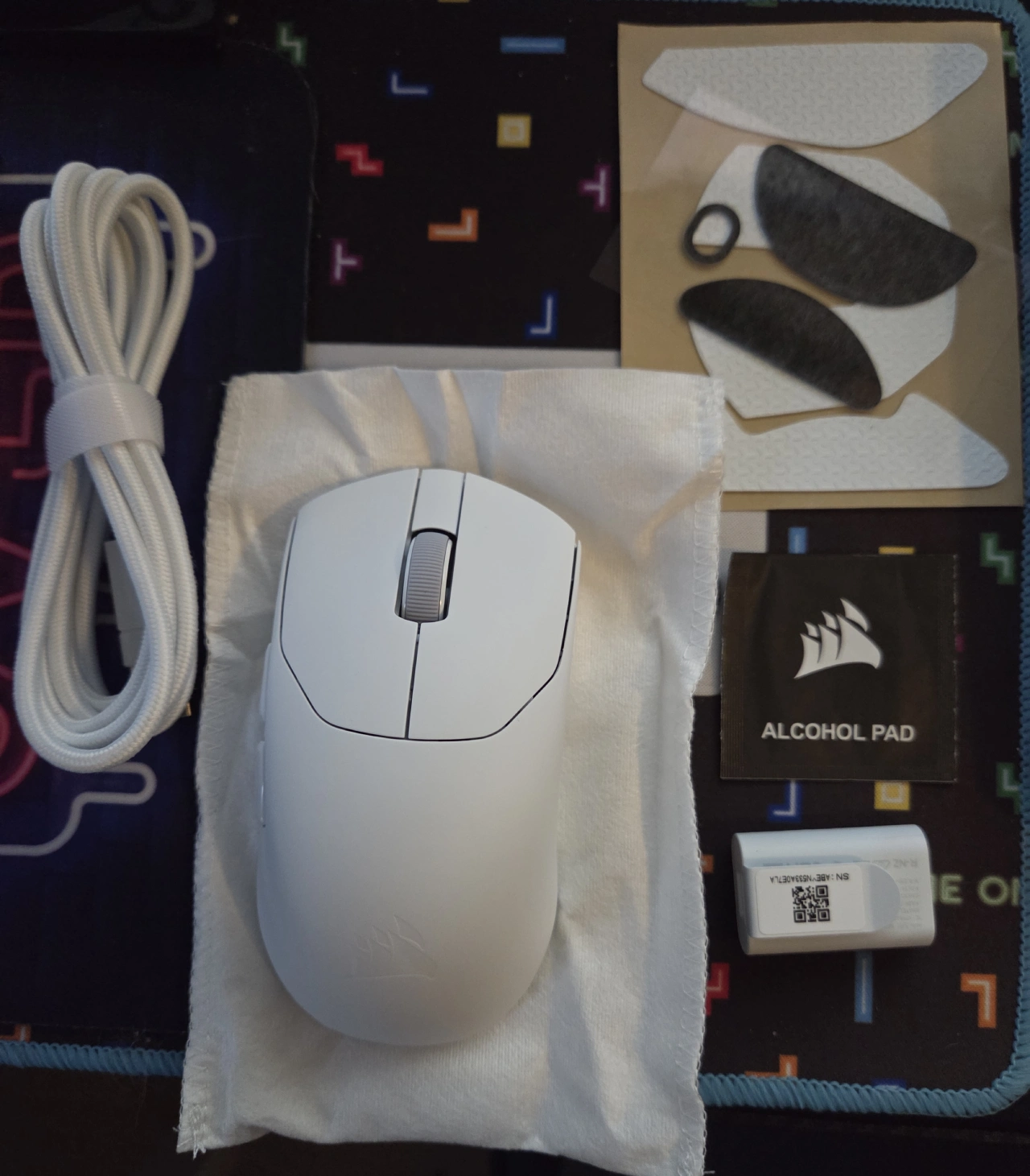
6. Tailored to you: Fine-tune your mouse to your preferences with the included grip tape and alternative mouse skates.
Box Contents

First Impressions & Setup
I took the mouse out of the box, and it is so light… compared with my current mouse, admittedly a different type and model, I initially thought I still needed to put a battery in it :). Seriously, though, the mouse feels good. I have fairly large hands, so it takes a little getting used to. The mouse is so light that I immediately understood how it could offer advantages in FPS games. I put that to the test, too: yes, it feels good, and you notice that you can react a little faster. If you are used to a heavier mouse, you will need some time to adjust to the Corsair Sabre v2 PRO wireless.

Setup is straightforward, and the manual makes it very easy.
Everyday Use & Gaming Experience
As mentioned, I am happy with how it performs. I did need to get used to using a lightweight mouse, but WOW! It feels great to game with. The included grip stickers let you customise the mouse by adding grip exactly where you need it. Clearly, a lot of thought has gone into this, so hats off to the developers. And that is before you consider how much gaming you can do without a cable.
Here is something worth knowing: we came across the following in the manual, and I thought it would be useful to highlight the “On-the-fly Cycling” feature and explain how it works:
On-the-fly Cycling Through DPI Profiles:
Preset DPI settings are available for quick configuration.
• Hold the RIGHT MOUSE BUTTON (B) and BACK BUTTON (E) for 3 seconds to advance to the next DPI stage.
• When you switch to a DPI stage, the indicator light on the mouse wheel flashes 3 times in the
corresponding DPI colour, then turns off.
• Repeat the steps above to advance to the next DPI stage. The mouse cycles through 5 DPI stages before returning to Stage 1.
Advanced configuration options are available through CORSAIR WEB HUB.
WEB HUB lets you further customise the mouse, including its buttons and DPI settings.
Conclusion:
And now… my verdict!
With its 330DPI and 8000 Hz hyperpolling, the Corsair Sabre v2 PRO wireless is an excellent mouse that is both lightweight and wireless. For me, it delivers an outstanding experience and feels great to game with, although it does take a little getting used to. As for the price, it currently costs around EUR 109. That does not make it a cheap mouse, but it is not an especially expensive one either. It is quite simple… the features, software, weight and specifications go a long way towards justifying the price. Corsair is a very reliable brand with years of experience, so I would say… are you ready for a new mouse? Or are you looking for a wireless mouse and play a lot of FPS games? If so, the Corsair Sabre v2 PRO wireless is well worth considering!
Verdict
Recommended – a strong pick in its class.
Pros
- Impressive specifications
- Software for customising settings
- 330DPI and 8000 Hz hyperpolling
- Grip stickers for a personalised feel
Cons
- Price is a little too high
- Light weight can take some getting used to