
Guides · Guides
Reviewkings Gaming Mouse Guide
Maurice De Pauw · February 6, 2024
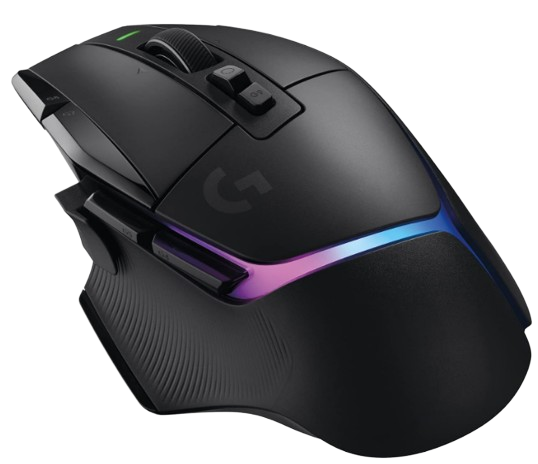
Reviewkings gaming mouse guide
A gaming mouse is a computer mouse specifically designed and optimized for gaming.
These mice often feature advanced functions and technologies that improve performance and responsiveness, giving gamers an edge during gameplay.
Key features:
DPI/CPI: This stands for Dots Per Inch (DPI) or Counts Per Inch (CPI), which indicates the mouse's sensitivity. The higher the DPI, the farther the cursor moves across the screen with a small movement of the mouse. Gaming mice often offer adjustable DPI settings, allowing players to fine-tune sensitivity to their liking.
Programmable buttons: Gaming mice often come with extra programmable buttons that can be assigned to different functions or macros. This lets you perform in-game actions quickly and efficiently without using the keyboard.
Polling rate: This refers to how often the mouse sends information to the computer. A higher polling rate means the mouse responds more quickly to movement. Gaming mice often offer adjustable polling rates for optimal performance.
Ergonomic design: Gaming mice are often designed with ergonomics in mind, making them comfortable to use for extended periods, even during intense gaming sessions. The design can vary depending on the user's grip style, such as palm grip, claw grip, or fingertip grip.
Sensor technology: Gaming mice use advanced optical or laser sensors for accurate tracking and positioning. Optical sensors are generally more accurate on flat surfaces, while laser sensors perform better across a variety of surfaces.
Weight adjustment: Some gaming mice let you adjust their weight by adding or removing small weights. This allows users to tailor the mouse to their personal preferences and play style.
RGB lighting: Many gaming mice feature customizable RGB lighting, allowing players to adjust the lighting colors and effects for a personalized look
How do you choose a gaming mouse?
- Consider your play style: If you frequently make quick movements, for example, a mouse with a high DPI and polling rate may be a better fit.
- Grip style: Choose a mouse that suits your grip style for optimal comfort and control.
- Budget: Gaming mice vary in price, from entry-level models to high-end options with advanced features. Set your budget and look for a mouse that meets your requirements.
- Read reviews: Check reviews and user feedback to learn more about the performance and durability of different gaming mice.
By considering these factors, you can find the gaming mouse that best suits your needs and preferences.